
Tuesday, October 23, 2012
Understanding Basics of UI Design Pattern MVC, MVP and MVVM
5:42 PM
Introduction
This is my first article and I hope you will like it. After reading this article, you will have a good understanding about "Why we need UI design pattern for our application?" and "What are basic differences between different UI patterns (MVC, MVP, MVVP)?”.
In traditional UI development - developer used to create a
View using window or usercontrol or page and then write all logical code (Event handling, initialization and data model, etc.) in code behind and hence they were basically making code as a part of view definition class itself. This approach increased the size of my view class and created a very strong dependency between my UI and data binding logic and business operations. In this situation, no two developers can work simultaneously on the same view and also one developer's changes might break the other code. So everything is in one place is always a bad idea for maintainability, extendibility and testability prospective. So if you look at the big picture, you can feel that all these problems exist because there is a very tight coupling between the following items.- View (UI)
- Model (Data displayed in UI)
- Glue code (Event handling, binding, business logic)
Definition of Glue code is different in each pattern. Although view and model is used with the same definition in all patterns.
In case of MVC it is controller. In case of MVP it is presenter. In case of MVVM it is view model.
If you look at the first two characters in all the above patterns, it remain same i.e. stands for model and view. All these patterns are different but have a common objective that is “Separation of Duties"
In order to understand the entire article, I request readers to first understand the above entity. A fair idea about these will help you to understand this article. If you ever worked on UI module, you can easily relate these entities with your application.
MVC (model view controller), MVP (model view presenter) and MVVM (model view view model) patterns allow us to develop applications with loss coupling and separation of concern which in turn improve testability, maintainability and extendibility with minimum effort.
MVVM pattern is a one of the best solutions to handle such problems for WPF and Silverlight application. During this article, I will compare MVC, MVP and MVVM at the definition level.
MVP & MVC
Before we dig into MVVM, let’s start with some history: There were already many popular design patterns available to make UI development easy and fast. For example, MVP (model view presenter) pattern is one of the very popular patterns among other design patterns available in the market. MVP is a variation of MVC pattern which is being used for so many decades. Simple definition of MVP is that it contains three components: Model, View and presenter. So view is nothing but a UI which displays on the screen for user, the data it displays is the model, and the Presenter hooks the two together (View and model).
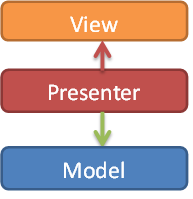
The view relies on a Presenter to populate it with model data, react to user input, and provide input validation. For example, if user clicks on save button, corresponding handling is not in code behind, it’s now in presenter. If you wanted to study it in detail, here is the MSDN link.
In the MVC, the Controller is responsible for determining which View is displayed in response to any action including when the application loads. This differs from MVP where actions route through the View to the Presenter. In MVC, every action in the View basically calls to a Controller along with an action. In web application, each action is a call to a URL and for each such call there is a controller available in the application who respond to such call. Once that Controller has completed its processing, it will return the correct View.
In case of MVP, view binds to the Model directly through data binding. In this case, it's the Presenter's job to pass off the Model to the View so that it can bind to it. The Presenter will also contain logic for gestures like pressing a button, navigation. It means while implementing this pattern, we have to write some code in code behind of view in order delegate (register) to the presenter. However, in case of MVC, a view does not directly bind to the Model. The view simply renders, and is completely stateless. In implementations of MVC, the View usually will not have any logic in the code behind. Since controller itself returns view while responding to URL action, there is no need to write any code in view code behind file.
MVC Steps
Step 1: Incoming request directed to Controller.

Step 2: Controller processes request and forms a data Model.

Step 3: Model is passed to View.

Step 4: View transforms Model into appropriate output format.
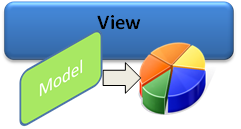
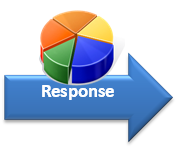
Step 5: Response is rendered.
So now you have basic understanding of MVC and MVP. Let’s move to MVVM.
MVVM (Model View ViewModel)
The MVVM pattern includes three key parts:
Model(Business rule, data access, model classes)View(User interface (XAML))ViewModel(Agent or middle man between view and model)
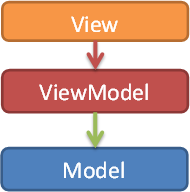
Model and View work just like MVC and “ViewModel” is the model of the View.ViewModelacts as an interface betweenmodelandView.ViewModelprovides data binding betweenViewandmodeldata.ViewModelhandles all UI actions by using command.
In MVVM,
ViewModel does not need a reference to a view. The view binds its control value to properties on a ViewModel, which, in turn, exposes data contained in model objects. In simple words, TextBox text property is bound with name property in ViewModel.
In
View:<TextBlock Text="{Binding Name}"/>
In
ViewModel:public string Name
{
get
{
return this.name;
}
set
{
this.name = value;
this.OnPropertyChanged("Name");
}
}
ViewModel reference is set to a DataContext of View in order to set view data binding (glue between view and ViewModel model).
Code behind code of
View:public IViewModel Model
{
get
{
return this.DataContext as IViewModel;
}
set
{
this.DataContext = value;
}
}
If property values in the
ViewModel change, those new values automatically propagate to the view via data binding and via notification. When the user performs some action in the view for example clicking on save button, a command on theViewModel executes to perform the requested action. In this process, it’s the ViewModel which modifies model data, View never modifies it. The view classes have no idea that the model classes exist, while the ViewModel and model are unaware of the view. In fact, the model doesn’t have any idea about ViewModel and view exists.Where to Use What in the .NET World
- Model-View-Controller (MVC) pattern
- ASP.NET MVC 4 Link
- Disconnected Web Based Applications
- Model-View-Presenter (MVP) pattern
- Web Forms/SharePoint, Windows Forms
- Model-View-ViewModel (MVVM) pattern
- Silverlight, WPF Link
- Data binding
Source : http://www.codeproject.com/
MVC Basics
12:11 PM
The ASP.NET MVC Framework is a web application framework that implements the model-view-controller pattern. Based on ASP.NET, it allows software developers to build a Web application as a composition of three roles:
Model, View and Controller
A model represents the state of a particular aspect of the application. Frequently, a model maps to a database table with the entries in the table representing the state of the application.
A controllerhandles interactions and updates the model to reflect a change in state of the application, and then passes information to the view.
A view accepts necessary information from the controller and renders a user interface to display that

Model, View and Controller
A model represents the state of a particular aspect of the application. Frequently, a model maps to a database table with the entries in the table representing the state of the application.
A controllerhandles interactions and updates the model to reflect a change in state of the application, and then passes information to the view.
A view accepts necessary information from the controller and renders a user interface to display that
View - just the UI (HTML), there's no much logic there only logic for taking data from the Model. View just take a Model and render it's content on the page. There's no code behind, no .aspx.vb or .aspx.cs
Model - contains all data that view needs to display
Controller - is the boss, the controller handling HTTP requests for web page and it's role is to create a model (read data from DB, bussiness logic etc) and selects proper view for render. Controller never interacts with the user interface, it's job of the View. And never holds any data or statements, it's job of the Model.
Folder structure of app:
- "Controllers" folder is the place where the controllers are placed. The name convention is the controller name must end with "Controller" word, for eg.: HomeController -> Home is the name of the controller. And "Controller" is required postfix. In the code you using just a name (for eg. Home) but controller classes needs the have there the Controller postfix to be properly handled by MVC engine.
- "Views" is the place for views.
When the view represents action result (for eg. aspx page) then view name needs to match with action names used for.
When view is usercontrol you can name it whatever you what.Under Views folder you will have list of folders with controller names and the one called Shared. The folders with the controller names are there just because the view is somehow associated with the controller. Another words when the controller return views that's the place where the MVC is looking for particular view that needs to be renders. The "Shared" folder is the place for user controls, master pages etc. The "Shared" folder contains views used by multiple controllers. - "Models" - place for object definitions that will be populated with the Controller and used by View for rendering.
Tuesday, July 24, 2012
Silverlight vs. HTML 5
12:19 PM
Most of the Silverlight Details are from this Silverlight Blog Post
|
Silverlight
|
HTML5
|
|
Can be programmed with a statically-typed .net language like
C#, which is compiled and a lot of errors can be caught at compile time.
|
Requires extensive javascript coding to extract maximum
functionality, which is not compiled and errors are prone, requiring
extensive testing. Also requires extensive CSS/CSS3 knowledge and usage.
|
|
Silverlight is a plugin works the same in IE and all other
browsers.
|
HTML5 is a work in progress, the standards body scheduled to
complete specs in 2022, could work differently in different browsers. Also it
might require using the DOM elements supported by the different browsers.
Requires understanding of the browser sensibilities to the DOM elements,
since all browsers are not standards compliant, especially IE.
UPDATE on 02/14/2011: HTML5 Spec to be completed in 2014, check this updated articlehttp://www.w3.org/News/2011.html#entry-9015 |
|
With newer versions of Silverlight released, newer browser
versions should support the older versions of silverlight. If we build in
Silverlight 4.0 and the application is running fine. If a newer version of a
browser is released which will not support Silverlight 4.0( instead it
supports a newer version of Silverlight), we may have to stop the users from
upgrading to a newer version of browser.
|
HTML5 as it is now, is not supported in older versions of the
browser like IE6 and IE7. HTML5 is also evolving and newer browser versions
will have better support for HTML5, but it may work differently in different
browsers, since there is no defined HTML5 standard as yet and it is a work in
progress. But for the most part, HTML5 once built should work in newer
versions of the browser.
|
|
Silverlight requires a plugin required to be installed in the
browser, as of now it is not bundled into the browser. Some systems might not
allow to install plugins.
|
HTML5 is built into the newer versions of the browser, no
plugin required.
|
|
Easier to program complex and rich functionality with a known
language like C#
|
Javascript is evolving faster, there are rich libraries like
jQuery which provide rich functionality but not equivalent to Silverlight.
|
|
Silverlight video plays as long as the silverlight plugin is
installed in the broswer. Will not work on Apple devices like iPad and
iPhone.
|
Depending on the encoding, if the video is encoded in H.264,
HTML5 will play the video in IE and Safari without installing any additional
plugin. Also works on Apple devices like iPad and iPhone. Firefox, Chrome and
Opera support Theora or Vorbis encoding, with support for WebM soon. Requires
the video to be encoded in more than one codec to support all browsers.
|
|
Silverlight on smartphones is a disadvantage since it is
resource hungry and not supported on all platforms.
|
HTML5 is lightweight comparatively since it is built into the
browser and it does not take up as much resources.
|
|
Silverlight application performance will be better since it is
already parsed and compiled into bytecode form.
|
Javascript performance is increasing rapidly with better javascript
engines in the newer browsers, but since it is dynamically typed language it
might not be the same as the statically-typed and compiled silverlight.
|
|
Intellectual Property Protection is better with Silverlight,
since it is not easy to reverse engineer a silverlight application.
|
There is no easy way to obfuscate HTML and Javascript, so
competitors can easily view the source.
|
|
Webkit layout engine based smartphone browsers like Safari,
Chrome and Opera do not support Silverlight. Webkit is evolving fast as the
mobile browser standard.
|
HTML5, Javascript and Css work well on Webkit based browsers.
Webkit javascript core called SquirrelFish compiles JavaScript into native
machine code, eliminating the need for a bytecode interpreter and thus
speeding up Javascript execution.
|
|
Client side local storage using IsolatedStorage, upto 1MB, can
be increased with permissions. Need to store in files and read from files.
Data stored in the local storage can be encrypted for security.
|
HTML5 supports SQLLite, a lightweight client side database,
can be saved and retrived as queries. Can store upto 5MB, not supported on
all browsers. Currently only Safari, Chrome and Opera. Not supported in IE
yet. Local storage data cannot be encrypted like Silverlight storage.
|
|
Silverlight can access the Webcam/Microphone on the users
desktop, providing richer media experiences.
|
HTML5 does not support access to the WebCam/Microphone as of
yet.
|
|
Silverlight videos content can be protected through DRM(
Digital Rights Management).
|
HTML5 videos do not support DRM
|
|
Silverlight supports adaptive smooth streaming, Silverlight
videos are encoded into 3 definitions, depending on the bandwidth
availability, it will stream the appropriate quality, like the highest
quality for the most bandwidth and the lowest quality for the least
bandwidth.
|
No such support in HTML5
|
|
Silverlight media supports Information Overlay/Picture in
Picture.
|
Not supported by default.
|
|
Great Stereoscopic 3D video support out of the box.
|
Supports 3D, but not as good as Silverlight.
|
|
Ability to broadcast live( video/audio) or streaming.
|
Not supported at this time.
|
|
Comes with a full set of 60+ pre-built controls with
customizable styles, also with several third party enhanced control libraries
available.
|
Need to work with available open source javascript plugins, or
can build functionality using Javascript, HTML5 and CSS/CSS3. To get some of
the functionality of advanced Silverlight controls, requires a lot of
scripting work.
|
|
Powerful data visualization through charting controls and
Silverlight Pivotviewer.
|
Plugins and libraries are available, but are not as rich as
the Silverlight controls.
|
|
Flexible data support including databinding, binary XML, LINQ
and local storage.
|
There is no 2-way databinding support, as well as support for
LINQ. HTML5 does support 2 flavors of local storage including SQLLite.
|
|
Provides Multicasting support, but it works on the UDP
protocol, which has a limitation since it is blocked by most common
firewalls. Also packet security needs to be built by the user since the
packet delivered cannot be guaranteed to be the same as the packet sent. But
great for interactive web applications.
|
No multicasting support yet.
|
|
Responsive UI with .net and Multithreading.
|
Can provide somewhat seamless experience through AJAX, but may
not be the same as Silverlight.
|
|
Conflicting recent views from Microsoft about the future of
Silverlight, creating some doubts in the minds of developers. Some confusion
about MS going to keep improving on Silverlight or put more efforts into
better HTM5 standards support.
|
HTML5 is evolving, so no way to know if there are going to be
a lot of changes or even if it requires tweaking code with future versions.
|
|
Silverlight works on most browsers and versions.
|
HTML5 is partially supported in Safari, Chrome and Firefox. IE
still does not support HTML5
|
|
Newer desktops, laptops, smartphones and tablets are coming
with 2 or more processor cores. Silverlight on .net framework is capable of
scaling upto 8 processor cores.
|
Javascript does not support true parallelism, it may come in
the future, but not right now.
|
|
Silverlight provides rich functionality out of the box or
third party control libraries, easy to upgrade an existing application with
newer versions of the controls, since most controls are built with backward
compatibility, can be upgraded easily by just referencing newer dlls.
|
To get all the functionality of the Silverlight controls, need
more than one javascript framework, library or plugin. All of them are not
fully tested, so need to upgrade several code sources to keep up with the
upgrades. Also all upgrades might not have proper backward compatibility.
|
|
Silverlight can be written once and deployed to the
web/desktop. ( Unfortunately cannot be deployed on Windows Phone 7 since it
uses a different set of lightweight controls)
|
HTML5 is a markup language for the web. It needs a web browser
to render itself.
|
|
Silverlight multi-touch support can take advantage of the
next-generation hardware natively.
|
Depends on the multi-touch support of the browser.
|
|
Silverlight can offload media rendering to the GPU for
Hardware Acceleration. More than one control which supports Hardware
Acceleration, 3D and Pixel shaders.
|
No Hardware Acceleration support as of yet. Plans to support
it in the future using WebGL technology for the HTML Canvas. WebGL will bring
Hardware Acceleration, 3D and pixel shaders.
|
|
Current web is built on the request/response architecture. A
user makes a request for a page to the server, the server sends back the page
to the client. After that the page remains static. With Silverlight, if there
is a change in the content in the server, it can be easily reflected in the
client with the Publisher/Subscriber architecture using net.tcp or WCF duplex
pooling.
|
Not so easy and elegant to do with AJAX and javascript,
requires lot more coding and also performance is slower.
|
|
Faster development with better IDE, tools and controls. Also
use existing developer language strengths.
|
Development tools are evolving for javascript, HTML and CSS.
|
|
Silverlight content is not indexed by the Search Engines, not
good for Search Engine Optimization.
|
HTML is Search Engine friendly, with HTML5 more semantic
capabilities are being added for providing better content to the Search
Engines.
|
Monday, July 9, 2012
SQL SERVER – 2005 List All Tables of Database
5:47 PM
This is very simple and can be achieved using system table sys.tables.
USE YourDBName
GO
SELECT *FROM sys.Tables
GO
This will return all the tables in the database which user have created.
Wednesday, May 9, 2012
DataGrid Double Click Event in Silverlight
5:36 PM
Click...Event
MouseLeftButtonUp="DataGrid_MouseLeftButtonUp"
Code...
UIElement element = sender as UIElement;
DateTime clickTime = DateTime.Now;
TimeSpan span = clickTime - _lastClick;
if (span.TotalMilliseconds > 300
|| _firstClickDone == false)
{
//"First click...";
_clickPosition = e.GetPosition(element);
_firstClickDone = true;
_lastClick = DateTime.Now;
}
else
{
Point position = e.GetPosition(element);
if (Math.Abs(_clickPosition.X - position.X) < 4
&& Math.Abs(_clickPosition.Y -
position.Y) < 4) //mouse didn't move => Valid
double click
{
//"Double
click...";
//######## LOGIC Code ########
}
else
// "Double Click failed due to mouse move!";
_firstClickDone = false;
}
Thanks & Regards,
www.galaxywebmind.com
Friday, May 4, 2012
How do I retrieve command-line arguments in my WPF application?
2:06 PM
Command-line arguments are typically
retrieved via a string array parameter passed to Main,
but the common way to define WPF applications doesn’t allow you to implement the Main
method. You can get around this in two different ways. One way is to forego defining an
Application-derived class in XAML, so you can manually define the Main method with a
string array parameter. The easier way, however, is to simply call
System.Environment.GetCommandLineArgs at any point in your application, which returns
the same string array you’d get inside Main.
but the common way to define WPF applications doesn’t allow you to implement the Main
method. You can get around this in two different ways. One way is to forego defining an
Application-derived class in XAML, so you can manually define the Main method with a
string array parameter. The easier way, however, is to simply call
System.Environment.GetCommandLineArgs at any point in your application, which returns
the same string array you’d get inside Main.
How do I retrieve command-line arguments in my WPF application?
1:04 PM
Command-line arguments are typically
retrieved via a string array parameter passed to Main,
but the common way to define WPF applications doesn’t allow you to implement the Main
method. You can get around this in two different ways. One way is to forego defining an
Application-derived class in XAML, so you can manually define the Main method with a
string array parameter. The easier way, however, is to simply call
System.Environment.GetCommandLineArgs at any point in your application, which returns
the same string array you’d get inside Main.
but the common way to define WPF applications doesn’t allow you to implement the Main
method. You can get around this in two different ways. One way is to forego defining an
Application-derived class in XAML, so you can manually define the Main method with a
string array parameter. The easier way, however, is to simply call
System.Environment.GetCommandLineArgs at any point in your application, which returns
the same string array you’d get inside Main.
Subscribe to:
Posts (Atom)